A marketplace account manager called you, or you found one of your own products sold on Amazon by someone else. Either way, the question comes up: should you go, and where do you start?
We have seen stores open three marketplaces in the same week and spend the following month handling cancellations. This guide does the opposite: one marketplace, a few dozen products, and a margin worked out before you sign up.
- Start with a single marketplace, chosen for your product category and the competition on your items.
- Work out your margin after fees before you apply: some platforms charge on the total amount, tax and shipping included.
- Prepare a clean catalog: GTINs, explicit titles, complete attributes, the right categories.
- Test 20 to 50 products for two months, measure, then expand or stop.
- A feed management tool pays off from your second channel, not before.
What you gain, what you give up
A marketplace lends you its traffic and its trust. A shopper who has never heard of your store orders without hesitation, because they pay on a site they already know.
In return, you pay a fee on every sale, often a subscription too, and you play by the platform's rules: shipping times, ratings, return policy. The customer mostly belongs to the marketplace, not to you.
- Reach shoppers who never go through Google
- Move items that sit idle on your site
- Test a new range before buying it in volume
- Making up for a site that doesn't convert
- Listing everything "to see what happens"
- Selling low-margin products and hoping for volume
The marketplaces worth knowing
They don't all play the same game. Some accept almost any business seller, others select applicants or only invite brands. This table sums up what each one states on its seller pages.
| Marketplace | Range | Access | Fee model | Good to know |
|---|---|---|---|---|
| Amazon | General | Online sign-up, ID and business documents | Individual plan (per item sold) or Professional (monthly), plus a referral fee by category | Optional Fulfillment by Amazon (FBA) |
| eBay | General, new and used | Online sign-up | Final value fee by category plus a per-order fee; free listings each month | No selection at the door |
| Etsy | Items made, designed, handpicked or sourced by the seller | Online sign-up, Creativity Standards apply | Listing fee + 6.5% transaction fee, no monthly cost | Offsite Ads: 15% fee on the sales they bring in |
| Walmart Marketplace | General (US) | Business tax ID required, GS1 GTINs | No setup or monthly fees, commission from 6% to 15% | Shipping through WFS or a US warehouse that handles returns |
| OnBuy | General (UK) | ID and business document checks | Monthly subscription + commission from 7% to 20% by category | Its seller platform is now called OnCommerce |
| Zalando | Fashion and lifestyle (Europe) | By invitation, no direct applications | Partner Program or Connected Retail, commission-based | Zalando Fulfillment Solutions for Partner Program brands |
Don't build your plan around a marketplace that hasn't accepted you yet. Zalando states that it does not accept direct applications, and many specialist marketplaces review each applicant. Have a fallback ready while you wait.
How to choose your first marketplace
The instinct is to go for the biggest one. It isn't always the best place to start: on a general marketplace, you land among established sellers with hundreds of reviews.
Your product range decides first
Handmade jewelry belongs on Etsy, a fashion brand on Zalando, a power drill on a home improvement marketplace. On a specialist platform, the shopper already walks into the right aisle, and the categories match your products.
The ten best-sellers test
Before applying, search for your ten best-selling products on the target marketplace. For each one, note the number of sellers and the lowest price.
- Nobody sells it: an opportunity, or a missing category. Find out which.
- Two or three sellers at a price close to yours: playable.
- Fifteen sellers, including the brand itself, below your cost price: skip that item.
Your capacity to keep up
Who answers messages on Saturday? Who packs orders if volume doubles in December? A marketplace that measures response times won't forgive an inbox checked twice a week.
Handmade, vintage or creative products: Etsy. Fashion brand in Europe: Zalando, if you get invited. Broad catalog in the US: Amazon, then Walmart Marketplace. In the UK: Amazon, eBay or OnBuy. Used or refurbished goods: eBay. Small budget and want to test without a subscription: Etsy, eBay or Amazon's Individual plan.
Work out your margin before signing up
Fees are not always charged on the base you expect. On eBay.com, the final value fee for most categories is 13.6% of the total amount of the sale, which includes shipping and sales tax, plus a fixed fee per order. Measured against your net price, it weighs more than the headline rate.
Total paid by the buyer: $59.90 × 1.08 = $64.69. Fee: 13.6% × $64.69 = $8.80, plus $0.40 per order = $9.20. Product cost $26, packing and shipping $6.50.
The real comparison isn't "$27 versus $18". It's $9.20 of fees against what an order costs you on your own site in ads and acquisition. If your campaigns cost you $12 per order for this lamp, the marketplace is more profitable. If your traffic is mostly organic, it's the other way around.
For reference, Amazon.com's referral fees range from 3% to 45% depending on the category, and Walmart Marketplace's commission from 6% to 15%. Rates change: read the grid for your category on the marketplace's pricing page before setting your prices.
Spread any subscription over your expected sales. With a handful of orders a month, a monthly plan can wipe out a whole month's margin. Etsy and Walmart Marketplace charge no monthly fee, which makes them comfortable for a test phase.
Open your seller account: documents and steps
Gather the paperwork before you start: an incomplete file blocks approval, and some checks take several days. Here is what marketplaces most often ask for:
- Your business registration or license
- Your tax ID (EIN in the US, VAT number in the UK and the EU)
- A government ID and proof of address
- A business bank account to receive payouts
- For Amazon, a chargeable credit card
- Your return policy and delivery times, already written
The process varies. Amazon and eBay work with open sign-up plus verification. Walmart Marketplace requires a business tax ID and does not accept a Social Security number. Selective platforms review each applicant: put your brand and your customer service forward.
On a selective marketplace, show in your application what their catalog is missing. "120 workshop lighting products you don't carry" carries more weight than a general presentation of your store.
Prepare a catalog the marketplace accepts
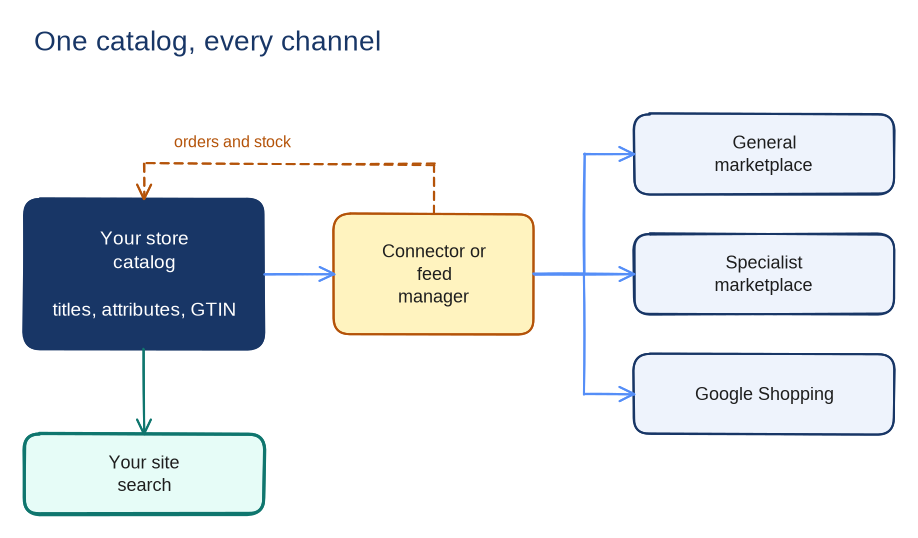
This is the longest step, and the one that decides your visibility. On a marketplace, shoppers go through the internal search engine: a badly titled or badly filed product doesn't exist.
GTINs, no exceptions
The GTIN (UPC or EAN barcode number) lets the marketplace match your offer to an existing product page. Walmart Marketplace requires GTINs tied to a GS1 company prefix. Without one, you often have to create the product page yourself, when that's allowed at all. If you make your own products, buy your codes from GS1 rather than making them up.
Titles that use the shoppers' words
Your site can get away with "Oslo Lamp". On a marketplace, among 3,000 lamps, nobody types Oslo. Put the product type first, then what sets it apart.
Attributes and the right category
Each marketplace category has its required attributes: wattage, dimensions, material, compatibility. They feed the filters. A product with no "E26 base" value disappears as soon as the shopper ticks that filter. Map your categories to theirs once, properly, rather than product by product.
A lighting store with 400 products prepares for a home marketplace. 310 products have a GTIN, 90 don't: they are in-house designs. It starts with 40 of the 310, the ones whose titles and attributes are already complete, and keeps its own designs for its site, where they stand out.
Shipping and customer service: where new sellers stumble
Marketplaces measure everything, and the sellers who drop out are rarely the ones with weak sales. They are the ones who ship late or reply late. Late shipments, cancellations and response times usually feed a seller score, and a low score can suspend your account. Read the marketplace's seller performance policy before you sign.
If your logistics are fragile, look at the platforms' own fulfillment programs: Fulfillment by Amazon, Walmart Fulfillment Services or Zalando's fulfillment solutions. You send your stock to their warehouses, and they pick, pack and deliver. It's paid by volume and storage, and your stock is tied up with them: count it as one more line in your margin.
Stock shared between your site and the marketplace. If the two don't sync, you sell the last unit twice and have to cancel an order. On a marketplace, a cancellation is expensive for your metrics. At first, set aside dedicated stock for the products you test.
Your first 90 days: test small, then expand
Three months are enough to know whether a marketplace is worth it for you. The plan below avoids the two classic mistakes: listing everything at once, or giving up after three weeks with no data.
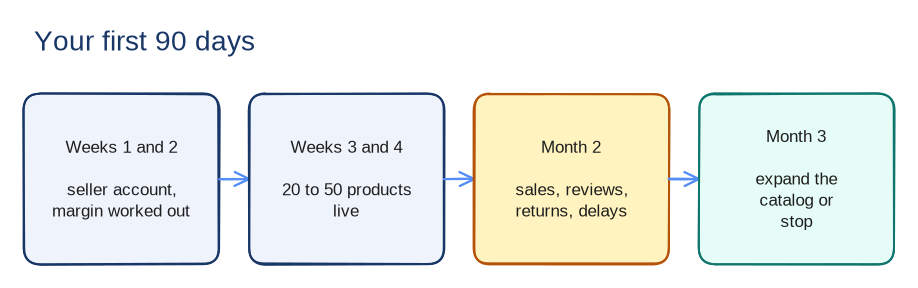
At the end of month two, ask yourself four questions, with figures:
- What net margin per order, subscription and returns included?
- Which products sell, and which get no views? The latter often have a title or category problem.
- How much time per week goes into messages, returns and disputes?
- Are your seller metrics in the green?
If the margin holds and the time spent stays reasonable, add products in batches of 50. If not, stop without regret: you will have learned which products sell outside your site, which helps for the next marketplace.
When to move to a feed management tool
For one marketplace and a few dozen products, your platform's official app or module is enough when it exists, or even the marketplace's own file upload.
Things change from two channels onwards. Each marketplace wants its own categories, attributes and titles, and orders need to come back into a single back office. That's what feed managers such as Lengow, Channable or DataFeedWatch are for. To pick one for your profile, see our comparison of product feed management tools.
A clean catalog also serves your own site
Vectail is not a marketplace selling tool, and it doesn't publish anything on Amazon or eBay. But the work you just did for them pays off somewhere else: the search on your own store.
Titles that say what the product is, complete attributes, consistent categories: that is exactly what a search engine needs to answer "black metal desk lamp". Vectail imports your catalog from Google Merchant Center to run your site search. If you cleaned your data for marketplaces and Google Shopping, your internal search benefits with no double entry. Our article on the Merchant Center feed as the foundation of site search details the fields that matter.
Your checklist
- One marketplace chosen for your range and the ten best-sellers test
- Margin worked out after fees, checking whether they apply to the net or the total amount
- Subscription spread over the expected number of sales
- Paperwork ready: registration, tax ID, ID, bank account
- 20 to 50 products with a GTIN, an explicit title and complete attributes
- Dedicated or synced stock to avoid cancellations
- Someone named to answer messages every day
- Review with figures at the end of month two, then expand or stop
Frequently asked questions
Which marketplace should I start with?
The one where your products already fit a clear category and where you won't be the twentieth seller on the same item. A marketplace that specializes in your niche (handmade, fashion, home improvement, electronics) is often easier to start on than a general one, provided your application is accepted.
Do I need a registered business to sell on a marketplace?
Usually, yes. Amazon asks for a business license or registration and tax information, Walmart Marketplace requires a business tax ID (a Social Security number is not accepted), and OnBuy checks identity and business documents. Check each platform's seller requirements for your country before you apply.
Will selling on a marketplace cannibalize my own store?
Partly, if you list your whole catalog at the same price. To limit it, start with products that sell little on your site or that bring in new customers, and keep for your store what a marketplace can't offer: advice, bundles, a loyalty program.
Is your catalog clean? Put it to work on your site
Vectail imports your catalog from Google Merchant Center and installs a search powered by Google Vertex AI on your store: results as you type, natural language understanding, typo tolerance. One line of code, no plugin.
Start for free - 14-day free trial, no credit card